Rendering
Enscape for Mac (2026): What Works, What Doesn't
Enscape runs on Mac — but only on Apple Silicon, and only with certain apps. Here's exactly what works, what doesn't, and what to do if you're on an Intel Mac.
· 5 min read
Enscape and Lumion are the two most popular real-time rendering tools for architects. This hands-on comparison covers speed, BIM integration, visualization quality, pricing, and which tool wins for your specific workflow.
Enscape and Lumion are the two most popular real-time rendering tools in architectural practice. Enscape is better for architects who work inside Revit, SketchUp, or Rhino and need renders directly from their BIM model with zero export steps. Lumion is better for projects that require high-quality landscape visualization, animations, and cinematic walkthroughs. Both tools use AI denoising to accelerate render quality. The right choice depends on your software stack, project type, and whether speed or visual richness is your priority.

Enscape is a real-time rendering plugin that runs directly inside Revit, SketchUp, Rhino, ArchiCAD, and Vectorworks. Rather than exporting your model to a separate application, Enscape renders it live as you design — any change you make in Revit appears in the render window instantly.
This zero-export workflow is Enscape's defining advantage. Architects using Enscape can generate a client-ready render during a design meeting without leaving their BIM environment. The AI denoiser produces smooth, noise-free images even on mid-range hardware.
Enscape is particularly popular among practices that use Revit as their primary design tool, because the integration is native and seamless. The render quality is excellent for architectural visualization — sharp materials, accurate lighting, and realistic shadows.
Watch how Enscape works inside Revit: https://www.youtube.com/watch?v=9Y7akGbfcgk (Enscape — Getting Started with Revit)
Lumion is a standalone real-time rendering application that connects to your design software via LiveSync — a live link that keeps your Lumion scene synchronized with your SketchUp, Revit, Rhino, or ArchiCAD model. Unlike Enscape, you work in Lumion's own environment rather than inside your BIM tool.
What Lumion trades in workflow integration it more than compensates for in visual output. Lumion's nature library — with 1,500+ plant species, detailed terrain tools, and weather effects — produces the most realistic landscape visualization of any rendering tool available to architects. Its animation tools are cinema-quality, with camera path controls, depth of field, motion blur, and style effects.
Lumion is the tool of choice for practices that regularly produce animated walkthroughs and heavily landscaped visualization for residential, masterplan, or mixed-use projects.
Watch Lumion in action for architectural visualization: https://www.youtube.com/watch?v=QLQly10vDWs&pp=ygU2V2F0Y2ggTHVtaW9uIGluIGFjdGlvbiBmb3IgYXJjaGl0ZWN0dXJhbCB2aXN1YWxpemF0aW9u (Lumion — Architectural Visualization Workflow)
Winner: Enscape
Enscape's native plugin integration means you never leave your design software. In Revit, the Enscape window runs alongside your model view — click render and your current camera view renders in real time. Changes to the model update instantly.
Lumion's LiveSync is excellent but requires working in two applications simultaneously. You model in SketchUp or Revit, and changes sync across to Lumion automatically. For architects who prefer to stay in one tool, Enscape wins decisively.
For SketchUp users specifically, the gap narrows — both tools integrate well, and some SketchUp architects prefer Lumion's richer scene-building environment.
Winner: Tie (depends on scene type)
For architectural renders of buildings with minimal landscaping — urban projects, interiors, commercial developments — Enscape and Lumion produce comparable results. Both achieve photorealistic quality sufficient for client presentations and competition submissions.
Where Lumion pulls ahead is landscape-heavy visualization. Lumion's nature rendering is unmatched: trees cast correct shadows at scale, grass density is realistic, water surfaces respond to wind, and seasonal changes are adjustable with a slider. If your project includes extensive grounds, a masterplan, or landscaped courtyards, Lumion's output is significantly better.
Enscape wins on interior quality at equivalent settings, particularly for accurate lighting, material reflections, and glass behavior.
Winner: Lumion
Lumion was built from the ground up for architectural animation. Its camera path tools, timeline editor, and style effects (sketch, watercolor, cinematic grading) produce polished video presentations that Enscape cannot match.
Enscape produces basic video walkthroughs — you set a camera path and it records. The output is clean and professional but limited in creative control. There is no style transfer, limited post-processing, and no weather animation.
For practices that regularly deliver animated presentations to clients or submit competition videos, Lumion is the clear choice.
Winner: Enscape (for BIM users)
Enscape's performance advantage comes from its deep integration with BIM geometry. It knows which elements are walls, which are glass, which are structure — and renders them with optimized shaders accordingly. The AI denoiser keeps frame rates smooth even in complex models.
Lumion requires importing your model (or live-linking it), which adds an extra layer that can introduce performance issues with very large models. For simpler models under 500MB, performance is comparable. For large Revit projects with detailed MEP, Enscape maintains smoother performance.
Winner: Enscape
Enscape has virtually no learning curve for architects already using Revit or SketchUp. Install the plugin, press the Enscape button, and you are rendering. Most architects are producing client-ready images within an hour of installation.
Lumion requires learning a new application environment. The interface is intuitive by rendering software standards, but setting up scenes, placing assets, and configuring the camera requires investment. Most architects need a week before they feel confident producing final deliverables.
Winner: Lumion
Lumion's asset library is the most comprehensive in the industry — over 6,800 objects including furniture, people, vehicles, trees, and terrain elements. The nature library alone (1,500+ plants) justifies the subscription for landscape-heavy practices.
Enscape's library has 3,500+ assets and is growing, but lacks the landscape depth of Lumion. For interior furniture and people, both libraries are adequate for professional work.
Enscape is cheaper:
Lumion is more expensive:
Both offer 14-day free trials. Both are Windows-only — no Mac support for either tool.
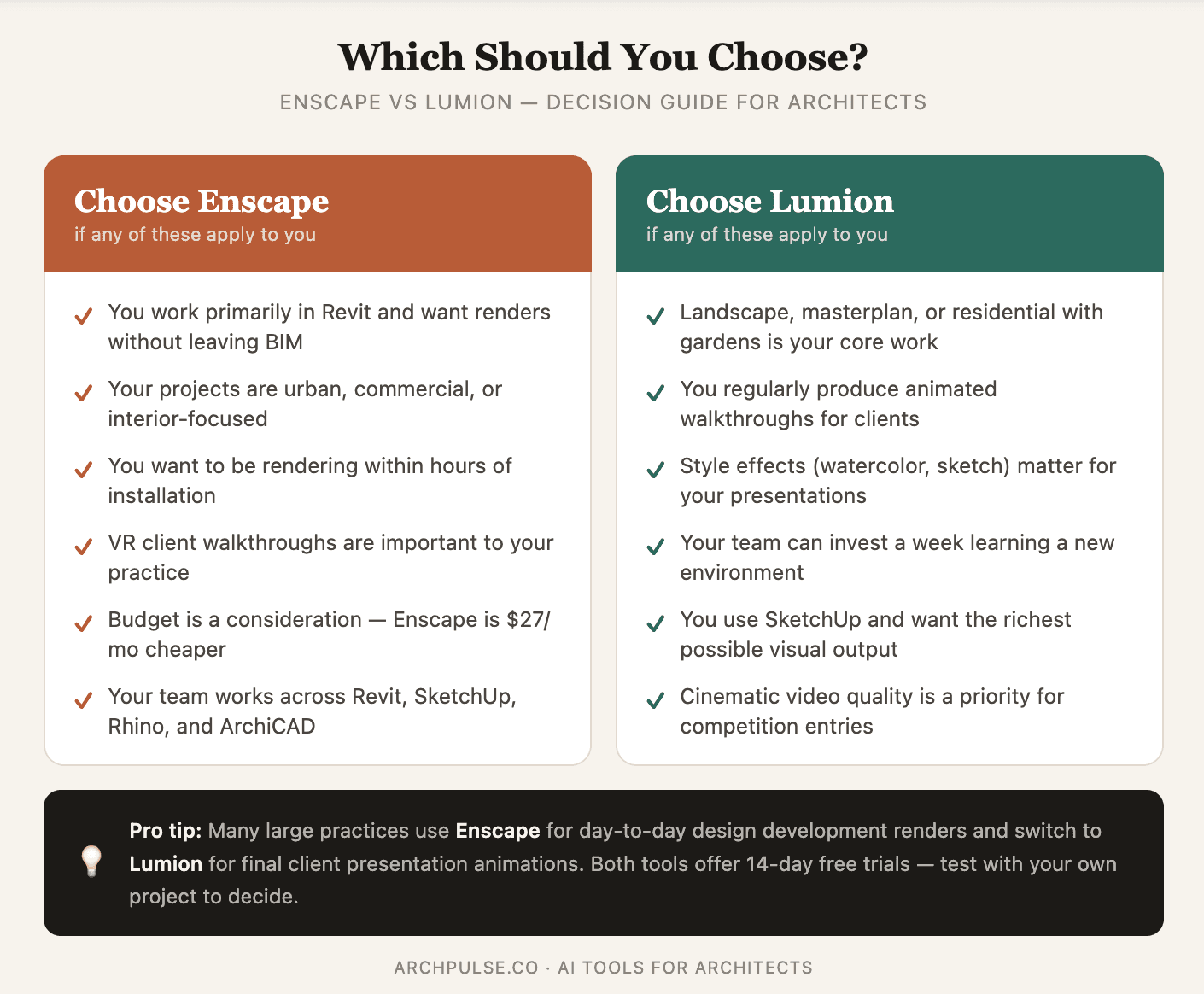
Choose Enscape if:
Choose Lumion if:
Use both if: Several larger practices use Enscape for day-to-day design development renders and Lumion for final client presentation animations. The two tools complement each other well — Enscape for speed, Lumion for polish.
Here is what architects are saying about both tools in 2026:
On Enscape: "The moment I installed it in Revit and saw my model render in real time, I never went back to offline rendering for design development. It changed how I present to clients entirely." — Architecture firm principal
On Lumion: "Nothing comes close to Lumion for landscape visualization. We do a lot of residential with large gardens and the tree rendering quality is just in another league." — Landscape architect
If neither Enscape nor Lumion fits your workflow, consider these alternatives:
You can explore and compare all these tools in the ArchPulse rendering category.
Is Enscape better than Lumion? Enscape is better for BIM-integrated workflows (Revit, SketchUp) where you want to render without leaving your design software. Lumion is better for landscape visualization and cinematic animations. Neither is universally better — the right choice depends on your project type and workflow.
Can Enscape and Lumion be used together? Yes. Many architecture practices use Enscape for design development renders during the project and switch to Lumion for final client presentation animations. The tools complement each other well.
Is Lumion worth the extra cost over Enscape? If you regularly produce landscape-heavy renders or animated walkthroughs, yes — Lumion's output quality in those areas justifies the extra $27-45/month. For BIM-focused practices without significant landscape work, Enscape delivers equivalent value at lower cost.
Do Enscape and Lumion work on Mac? No — both Enscape and Lumion are Windows only as of 2026. Mac users should consider Twinmotion (which has a Mac version) or cloud-based rendering alternatives.
What GPU do I need for Enscape or Lumion? Both tools recommend an NVIDIA RTX GPU for best AI denoising performance. Minimum: NVIDIA GTX 1060 6GB or AMD equivalent. Recommended: NVIDIA RTX 3070 or better for smooth real-time walkthroughs in complex models.
Is there a free version of Enscape or Lumion? Both offer 14-day free trials with full functionality. There is no permanent free tier for either tool. Twinmotion offers a free version for architects as an alternative.
Which is faster, Enscape or Lumion? Enscape renders faster for BIM models because it integrates natively with the model geometry. Lumion can be faster for complex scenes once set up, particularly for animation rendering using its cloud rendering option.
Both Enscape and Lumion are excellent tools that have earned their place as standards in professional architectural practice. Enscape wins on workflow integration and ease of use — particularly for Revit users. Lumion wins on landscape quality and animation production.
The most practical advice: download both free trials with the same project and render the same view. The difference in output for your specific type of work will make the decision obvious within an afternoon.
Explore all rendering tools for architects in the ArchPulse rendering category, or use our tool finder quiz to get a personalised recommendation based on your workflow.
Share this article
Enscape runs on Mac — but only on Apple Silicon, and only with certain apps. Here's exactly what works, what doesn't, and what to do if you're on an Intel Mac.
Enscape is a real-time rendering plugin that turns your Revit or SketchUp model into a photorealistic walkthrough — live, inside your design software. Here's what it does, who it's for, and how it compares.
Enscape isn't free for students, but the education license gets you the full software plus all its AI tools for a fraction of the commercial price. Here's what's included and how to qualify.